

UX Case Study
From Gaps to Gains: New Feature Design for Mi Home Monitoring
January 2025 - Personal Project
Project Context
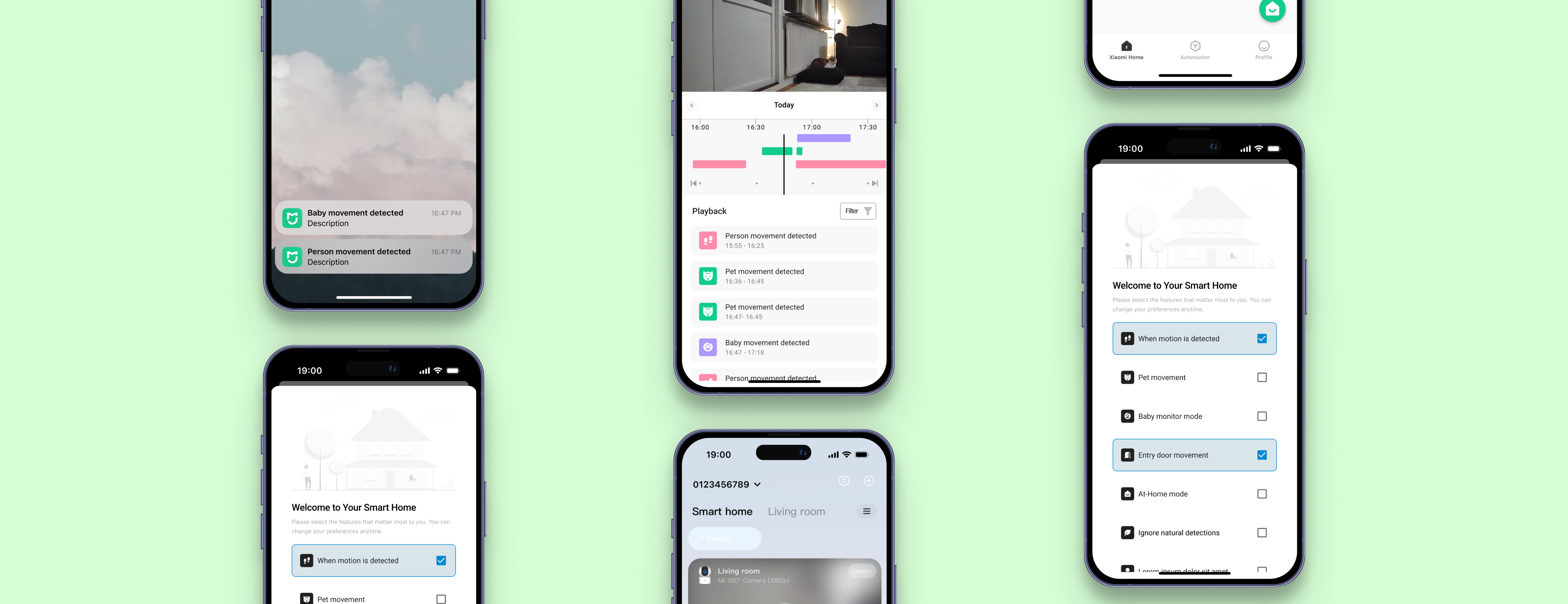
This project offers suggestions to make the Mi Home app more user-friendly. It focuses on improvements like motion classification, customizable detection settings, and a seamless onboarding experience.
Project Details
Type
Case Study
Role
Product Designer
Project Tags
Mi Home, Home Security
Project Source
View the complete case study on Figma
Problem Statement

Problem
Users struggle with inaccurate motion detection and a lack of customization options, causing unnecessary notifications and difficulty in focusing on the movements that matter most, leading to a disrupted and unreliable home monitoring experience.

Solution
By improving motion detection accuracy and offering customization options for users to detect specific types of movements, we can reduce unnecessary notifications and help them focus on critical activities, providing a seamless and reliable home monitoring experience
Competitive Analysis
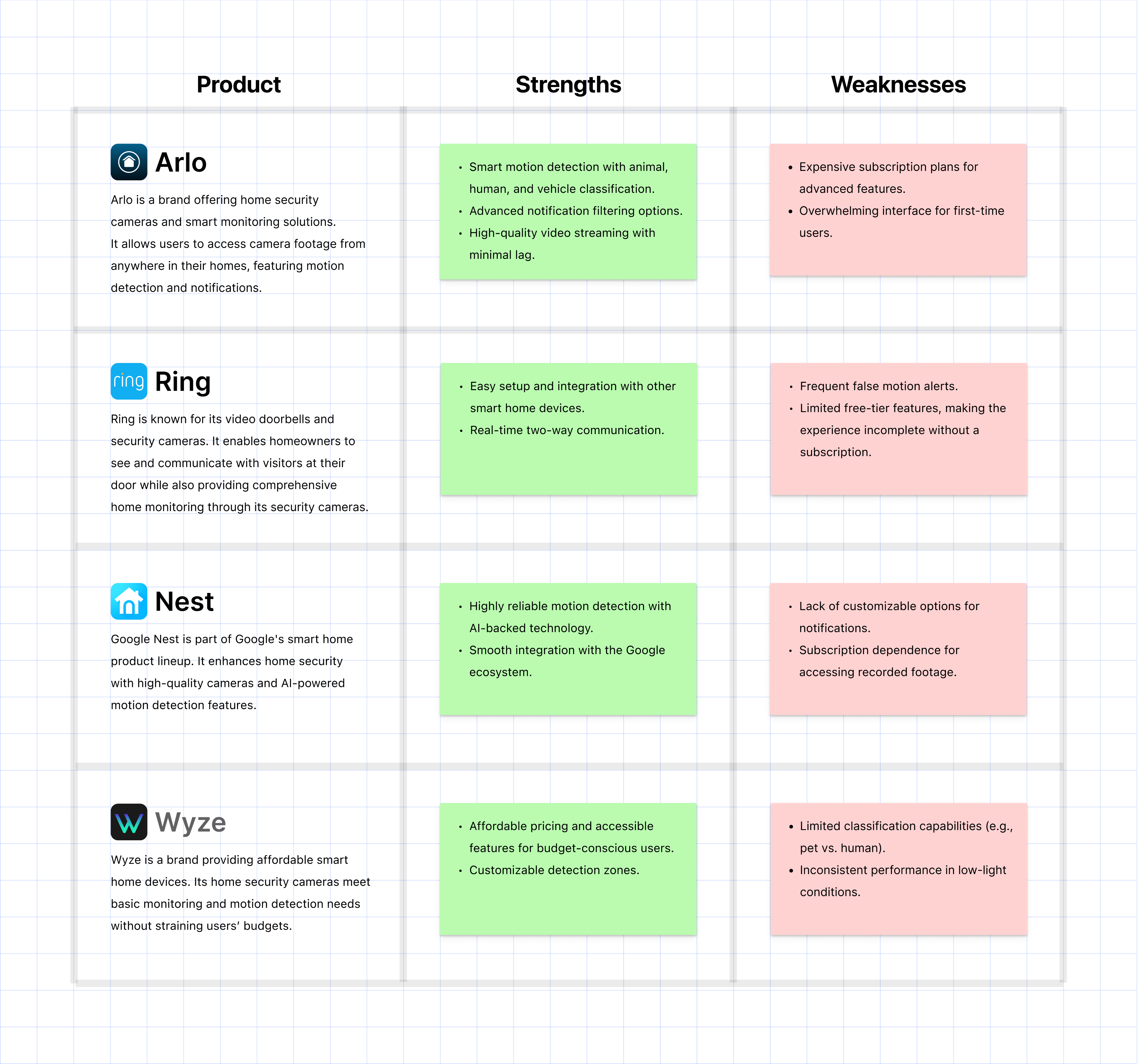
After identifying the key problems users face with home monitoring applications, I analyzed some of the most popular competitors in the market to understand their strengths, weaknesses, and opportunities for improvement.
Persona
I created this persona to better understand our users' needs, motivations, and goals. It’s based on research insights and will help guide design decisions throughout the feature development process.

Name: Anna Ellison
Age: 35
Occupation: Working parent
Job: Freelance Designer
Family Status: Married with 2 children, 1 cat
Location: Lives in a city and values home security highly
Technology Usage: Familiar with mobile apps, tech-friendly but not highly tech-savvy
Goals and Expectations

Wants to ensure the safety of her children and home.
Aims not to miss any important updates about her home while at work.
Expects notifications to be meaningful and helpful.
Behaviors

Prefers to quickly check notifications and focus only on important ones.
Avoids complicated settings and appreciates a simple, user-friendly interface.
Needs to feel confident in the reliability of motion detection; otherwise, she might stop using the app.
Pain Points

Missing critical movements due to excessive, irrelevant notifications.
Motion detection not accurately classifying events (e.g., pet vs. human movement).
Difficulty accessing past events due to poor filtering options.
Experiencing lag or freezing in live streams, making her feel disconnected from her home.
Lack of customization options tailored to her specific needs.
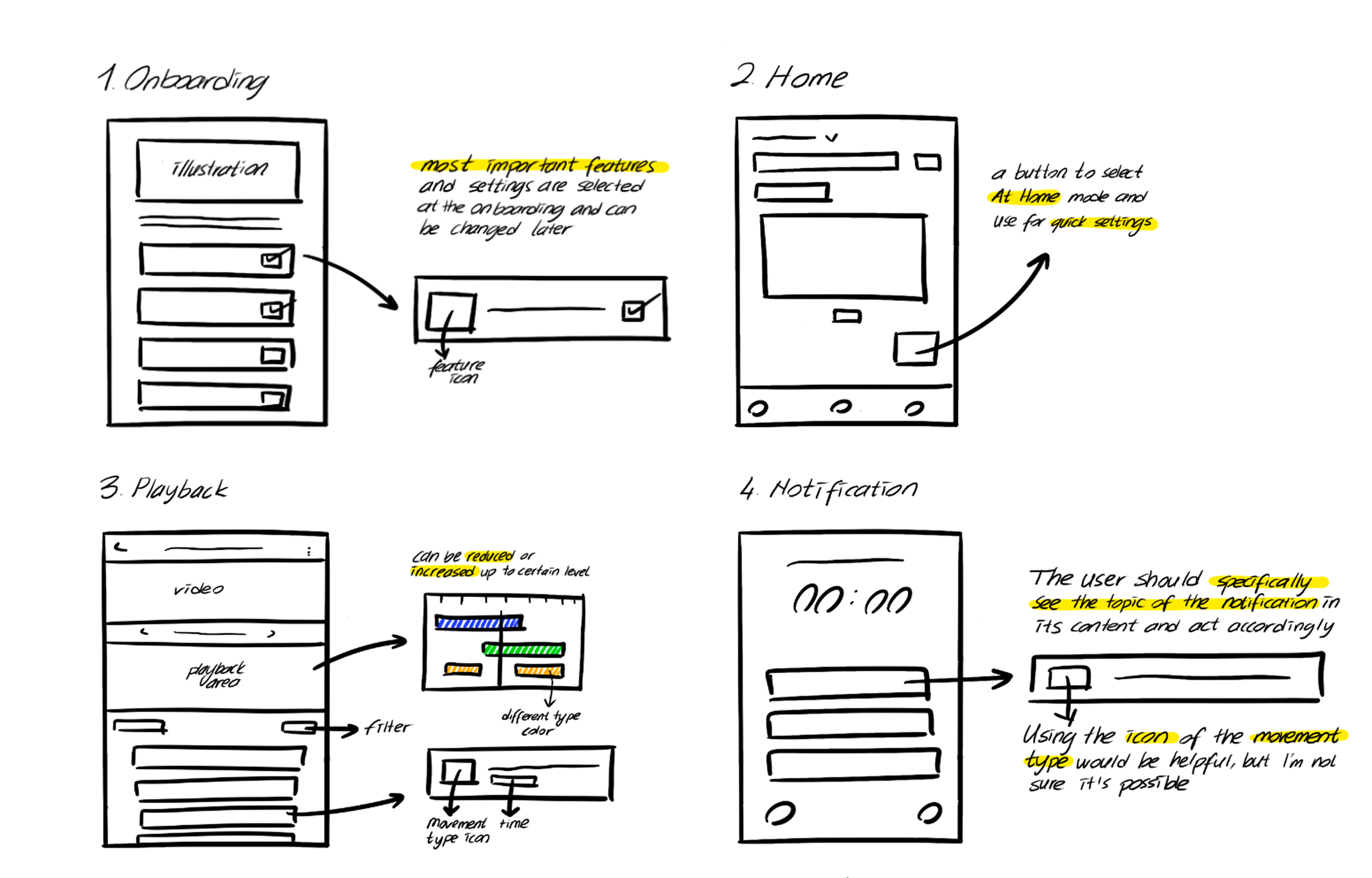
Solution Ideation

How might we help users focus only on the critical movements that matter to them?
How might we reduce unnecessary notifications while ensuring important events are not missed?
How might we create a seamless and user-friendly experience for managing and reviewing home security events?
How might we offer users customization options to define what types of movements they want to monitor?
UI Design
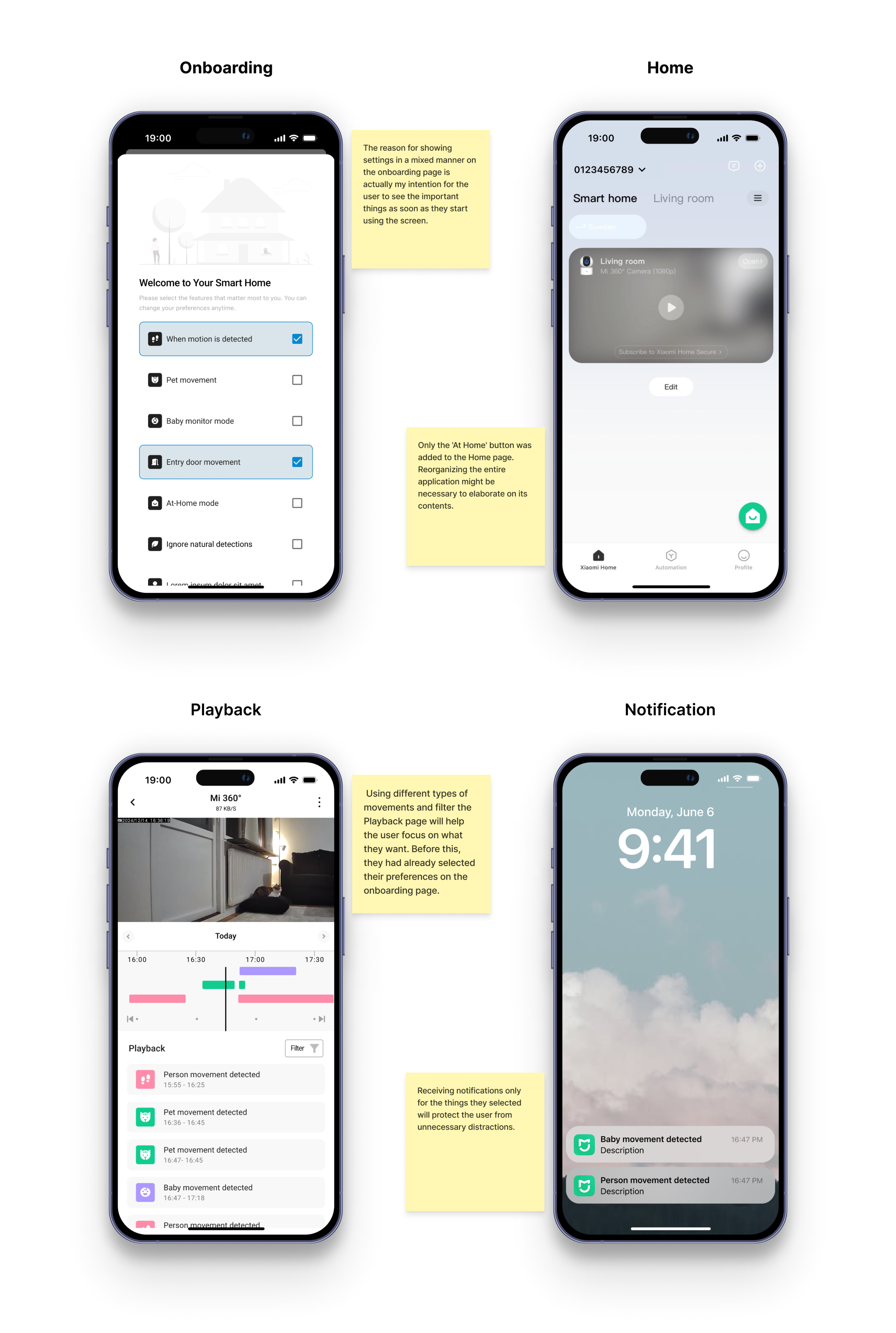
I translated the UX structure into high-fidelity UI designs for the onboarding, home, playback, and notification screens, focusing on usability and visual harmony.
UX Case Study
From Gaps to Gains: New Feature Design for Mi Home Monitoring
January 2025 - Personal Project
Project Context
This project offers suggestions to make the Mi Home app more user-friendly. It focuses on improvements like motion classification, customizable detection settings, and a seamless onboarding experience.
Project Details
Type
Case Study
Role
Product Designer
Project Tags
Mi Home, Home Security
Project Source
View the complete case study on Figma
Problem Statement
Problem
Users struggle with inaccurate motion detection and a lack of customization options, causing unnecessary notifications and difficulty in focusing on the movements that matter most, leading to a disrupted and unreliable home monitoring experience.
Solution
By improving motion detection accuracy and offering customization options for users to detect specific types of movements, we can reduce unnecessary notifications and help them focus on critical activities, providing a seamless and reliable home monitoring experience
Competitive Analysis
After identifying the key problems users face with home monitoring applications, I analyzed some of the most popular competitors in the market to understand their strengths, weaknesses, and opportunities for improvement.
Persona
I created this persona to better understand our users' needs, motivations, and goals. It’s based on research insights and will help guide design decisions throughout the feature development process.
Name: Anna Ellison
Age: 35
Occupation: Working parent
Job: Freelance Designer
Family Status: Married with 2 children, 1 cat
Location: Lives in a city and values home security highly
Technology Usage: Familiar with mobile apps, tech-friendly but not highly tech-savvy
Goals and Expectations
Wants to ensure the safety of her children and home.
Aims not to miss any important updates about her home while at work.
Expects notifications to be meaningful and helpful.
Behaviors
Prefers to quickly check notifications and focus only on important ones.
Avoids complicated settings and appreciates a simple, user-friendly interface.
Needs to feel confident in the reliability of motion detection; otherwise, she might stop using the app.
Pain Points
Missing critical movements due to excessive, irrelevant notifications.
Motion detection not accurately classifying events (e.g., pet vs. human movement).
Difficulty accessing past events due to poor filtering options.
Experiencing lag or freezing in live streams, making her feel disconnected from her home.
Lack of customization options tailored to her specific needs.
Solution Ideation
How might we help users focus only on the critical movements that matter to them?
How might we reduce unnecessary notifications while ensuring important events are not missed?
How might we create a seamless and user-friendly experience for managing and reviewing home security events?
How might we offer users customization options to define what types of movements they want to monitor?
UI Design
I translated the UX structure into high-fidelity UI designs for the onboarding, home, playback, and notification screens, focusing on usability and visual harmony.


UX Case Study
From Gaps to Gains: New Feature Design for Mi Home Monitoring
January 2025 - Personal Project
Project Details
Type
Case Study
Role
Product Designer
Project Tags
Mi Home, Home Security
Project Source
View the complete case study on Figma
Project Context
This project offers suggestions to make the Mi Home app more user-friendly. It focuses on improvements like motion classification, customizable detection settings, and a seamless onboarding experience.
Problem Statement
Problem
Users struggle with inaccurate motion detection and a lack of customization options, causing unnecessary notifications and difficulty in focusing on the movements that matter most, leading to a disrupted and unreliable home monitoring experience.
Solution
By improving motion detection accuracy and offering customization options for users to detect specific types of movements, we can reduce unnecessary notifications and help them focus on critical activities, providing a seamless and reliable home monitoring experience
Competitive Analysis
After identifying the key problems users face with home monitoring applications, I analyzed some of the most popular competitors in the market to understand their strengths, weaknesses, and opportunities for improvement.
Persona
I created this persona to better understand our users' needs, motivations, and goals. It’s based on research insights and will help guide design decisions throughout the feature development process.
Name: Anna Ellison
Age: 35
Occupation: Working parent
Job: Freelance Designer
Family Status: Married with 2 children, 1 cat
Location: Lives in a city and values home security highly
Technology Usage: Familiar with mobile apps, tech-friendly but not highly tech-savvy
Goals and Expectations
Wants to ensure the safety of her children and home.
Aims not to miss any important updates about her home while at work.
Expects notifications to be meaningful and helpful.
Behaviors
Prefers to quickly check notifications and focus only on important ones.
Avoids complicated settings and appreciates a simple, user-friendly interface.
Needs to feel confident in the reliability of motion detection; otherwise, she might stop using the app.
Pain Points
Missing critical movements due to excessive, irrelevant notifications.
Motion detection not accurately classifying events (e.g., pet vs. human movement).
Difficulty accessing past events due to poor filtering options.
Experiencing lag or freezing in live streams, making her feel disconnected from her home.
Lack of customization options tailored to her specific needs.
Solution Ideation
How might we help users focus only on the critical movements that matter to them?
How might we reduce unnecessary notifications while ensuring important events are not missed?
How might we create a seamless and user-friendly experience for managing and reviewing home security events?
How might we offer users customization options to define what types of movements they want to monitor?
UI Design
I translated the UX structure into high-fidelity UI designs for the onboarding, home, playback, and notification screens, focusing on usability and visual harmony.
Suheda Kocal
Based in Malmö, Sweden
Let’s Talk
akhancersuheda@gmail.com


